One Key for All Your Devices
My first plan for encrypted DMs worked on paper and fell apart on real devices. Here's what replaced it.
Title: One key for all your devices
Date: 17 November 2026
Author: Sivert Gullberg Hansen
Keywords: end-to-end encryption, MLS, device linking, key handover, iCloud Keychain
Abstract
Direct messages in Gryt have been end-to-end encrypted since September, and since 1.12 they run on MLS, so every message gets its own key. That part held up. The trouble was everything around it: how a new phone or computer gets your key, what happens when it can't, and who's allowed to change it. Each device quietly made a key of its own, so one account could turn into three people. A password-locked copy of your key sat on the server, where anyone with the database could keep guessing. And one account could have a different key on each server. This post goes through what broke, what I tried, and the model Gryt uses now: one key per account, new devices approved by one you already have, and only your own devices can ever change that key, apart from a slow reset they can stop. Nobody has to remember a password for it. It also shows the sketches I drew with Claude while working it out, because the screens are where most of the mistakes were.
1 Introduction
I've been working on encrypted DMs for a few months now, and for a while it felt like every fix turned up the next problem. My first plan worked when I tested it on one computer. It stopped working the moment I used Gryt the way people actually do: a desktop, a phone, a browser at work, a new laptop.
None of that time was wasted. Every one of those problems told me something about what the design had to guarantee, and the version out now is built on them.
2 Where it started
DMs shipped unencrypted in 1.7, with a line in every conversation saying the server could read them. Two weeks later they were encrypted on your machine [1]. That first design used one key made from your 24 words, for everything, forever. If that key ever leaked, every DM the server had stored could be opened.
1.12 moved DMs to MLS [2], the IETF standard for group messaging. Every message gets its own key, deleted once it's been decrypted, so a key stolen later can't open old messages. MLS also handles adding and removing devices, which is the part this post is about.
3 What went wrong
3.1 Every device made its own key
In MLS each device is a member of the conversation. Gryt then needs to know which devices belong to which person. Early on, every device simply made its own identity the first time it needed one. So my desktop, my phone and my browser were three different "me"s, and the apps of the people I talked to had to decide which one to trust.
It showed up as a bug report from myself. My desktop said a DM with Sable was encrypted, but every message failed with "this device hasn't been added yet", and her replies never arrived. Only a device that's already in a conversation can add another one, and nothing was adding mine.
3.2 A password on the server
To get your key onto a new device without another device around, Gryt kept a copy of it on your account, locked with a message password. It's a common approach, and I talked myself into it. But it means the server holds something that unlocks your account. Anyone who gets that database can try passwords for as long as they like, and most people's passwords don't survive that. It's gone now, and devices that still had a copy deleted it themselves.
3.3 A different key on each server
The last one I found while testing a fresh Mac in October. My account used my iPhone's key on one server and my old Mac's key on another, left over from before any of this was tidied up. The new Mac got approved on one and was stuck on the other, and the only way out was a button called "Start fresh". Worse, that button meant anyone signed in to my account could replace my key, and my contacts would only see a warning.
4 How it works now
4.1 One key, many devices
Your account has one key. The first device you use makes it, and no other device ever makes its own. Every other device gets that key from one you already have.
On an iPhone or a Mac, the key also rides along in iCloud Keychain, end to end encrypted by Apple. On Android it goes in your Google backup. So a new Apple device signed in to the same Apple ID often has your key before you've done anything.
4.2 New devices are approved
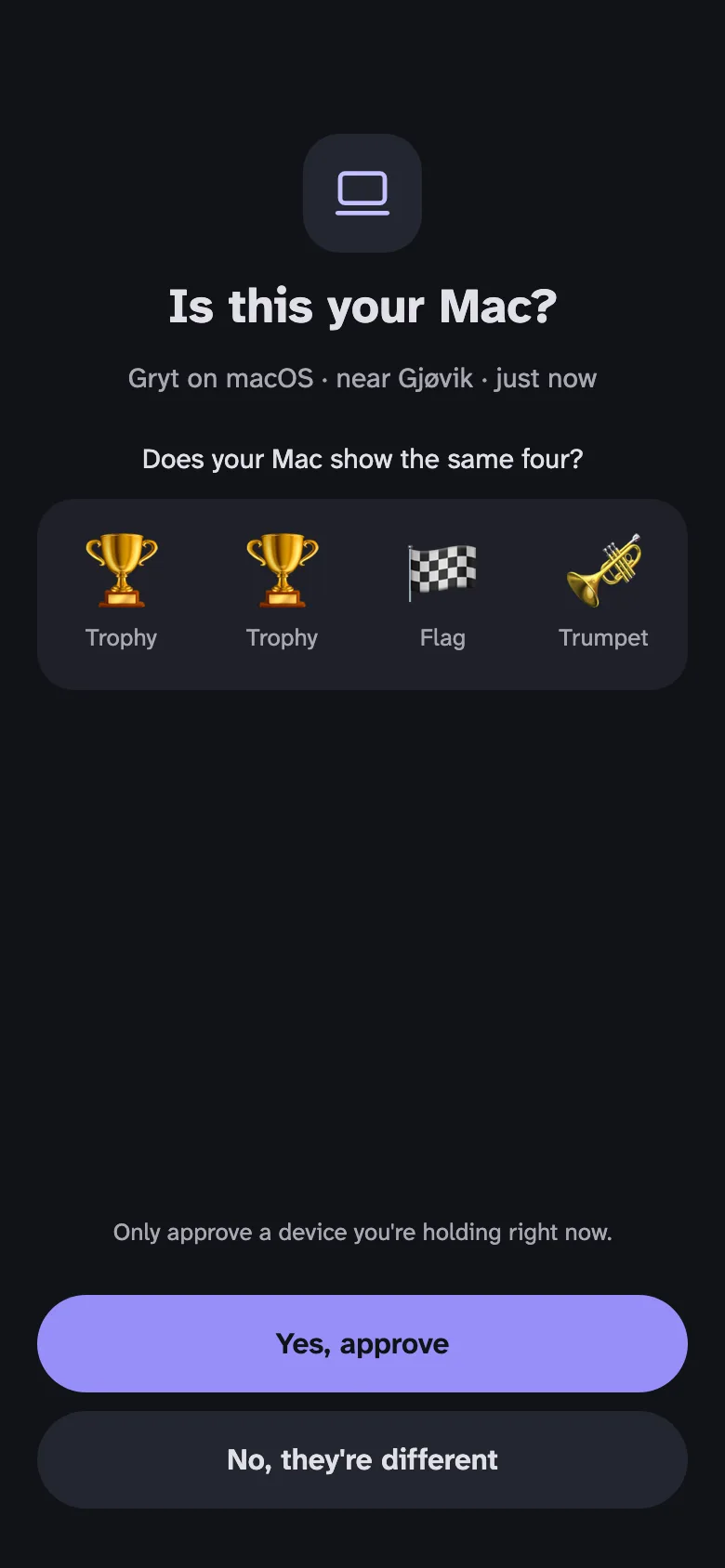
On a new computer, Gryt shows a code. You point your phone's camera at it, Gryt opens and asks "Is this your Mac?", and both screens show the same four pictures. If they match, you approve with Face ID, and your phone hands the key over, along with your older messages.
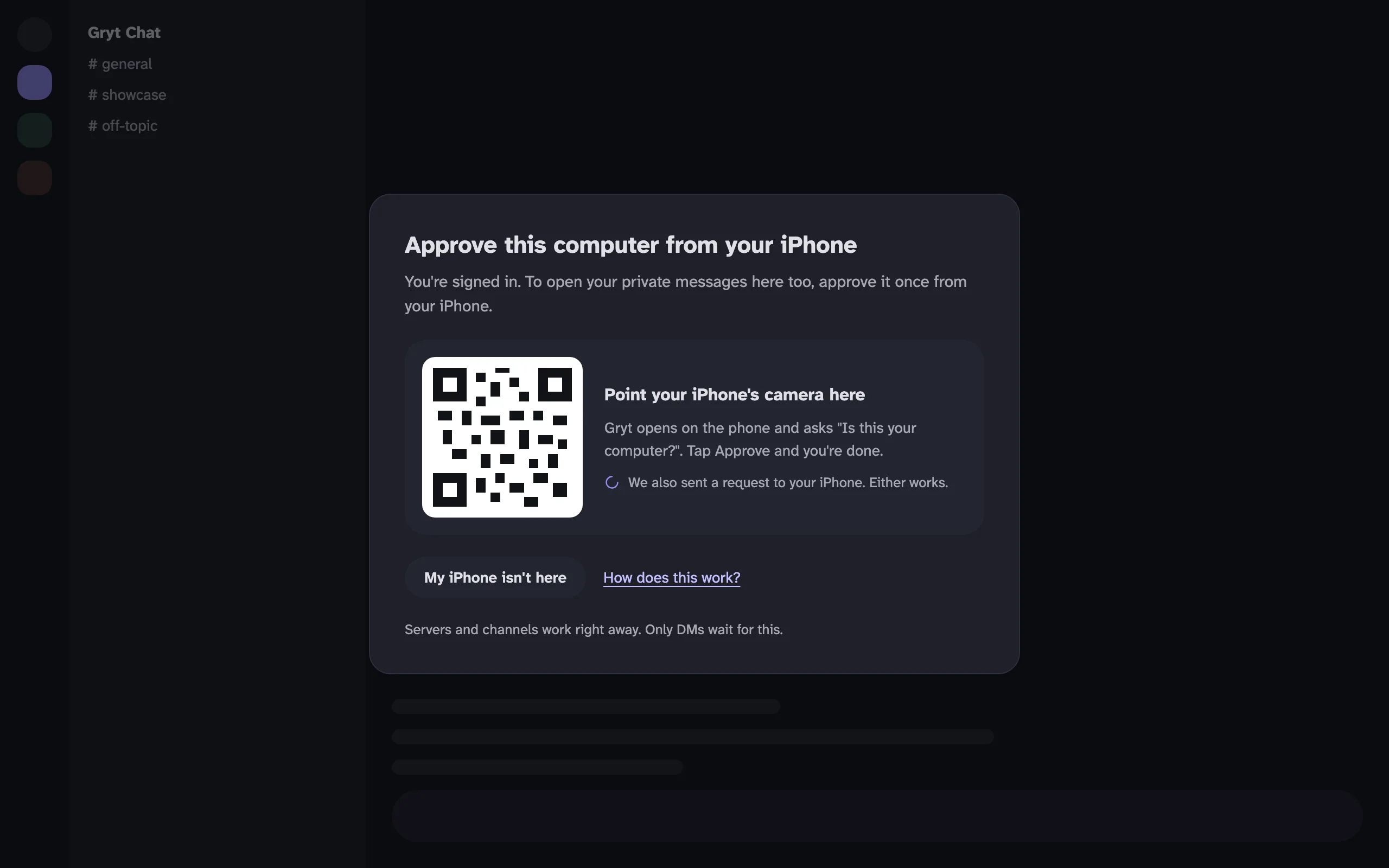 A sketch of the new-computer window: "Approve this computer from your iPhone", a QR code with "Point your iPhone's camera here", and buttons for "My iPhone isn't here" and "How does this work?". Underneath it says servers and channels work right away, and only DMs wait for this
A phone sketch: "Is this your Mac?", Gryt on macOS near Gjøvik, four emoji to compare, and "Yes, approve" or "No, they're different"
The pictures are a check that you're approving the device in front of you, and not one somebody else started. A request also reaches your phone as a notification, so you don't have to go looking for it.
4.3 Servers follow your account
Your account's public key lives with the account service now, in a key book that lists every key the account has had and when it changed. A device only gets signed in as you if it can prove it holds that key, so a device without it can't quietly turn into a second you.
When a server still has an older key for you, the next device that connects with your account's key moves that server over by itself. It signs the move with the account key, and the server checks the signature against the key your sign-in names. Nothing to approve, and no other device has to be online. Someone who only has your password can't do this, because they can't prove the key.
People you talk to on that server see your key change once and compare codes with you. They can't look you up in the key book instead, and that's deliberate: a server doesn't learn which account you are, so nobody can follow you from one server to the next.
4.4 When you've lost everything
If you've lost every device and your 24 words, there's still a way back, and it's slow on purpose. You ask for a reset on your account, and the new key only takes over after 30 days. Until then, any device of yours that's left can stop it. Thirty days is long enough that a thief can't finish one while you're on holiday. Once it goes through, the people you talk to compare codes with you once.
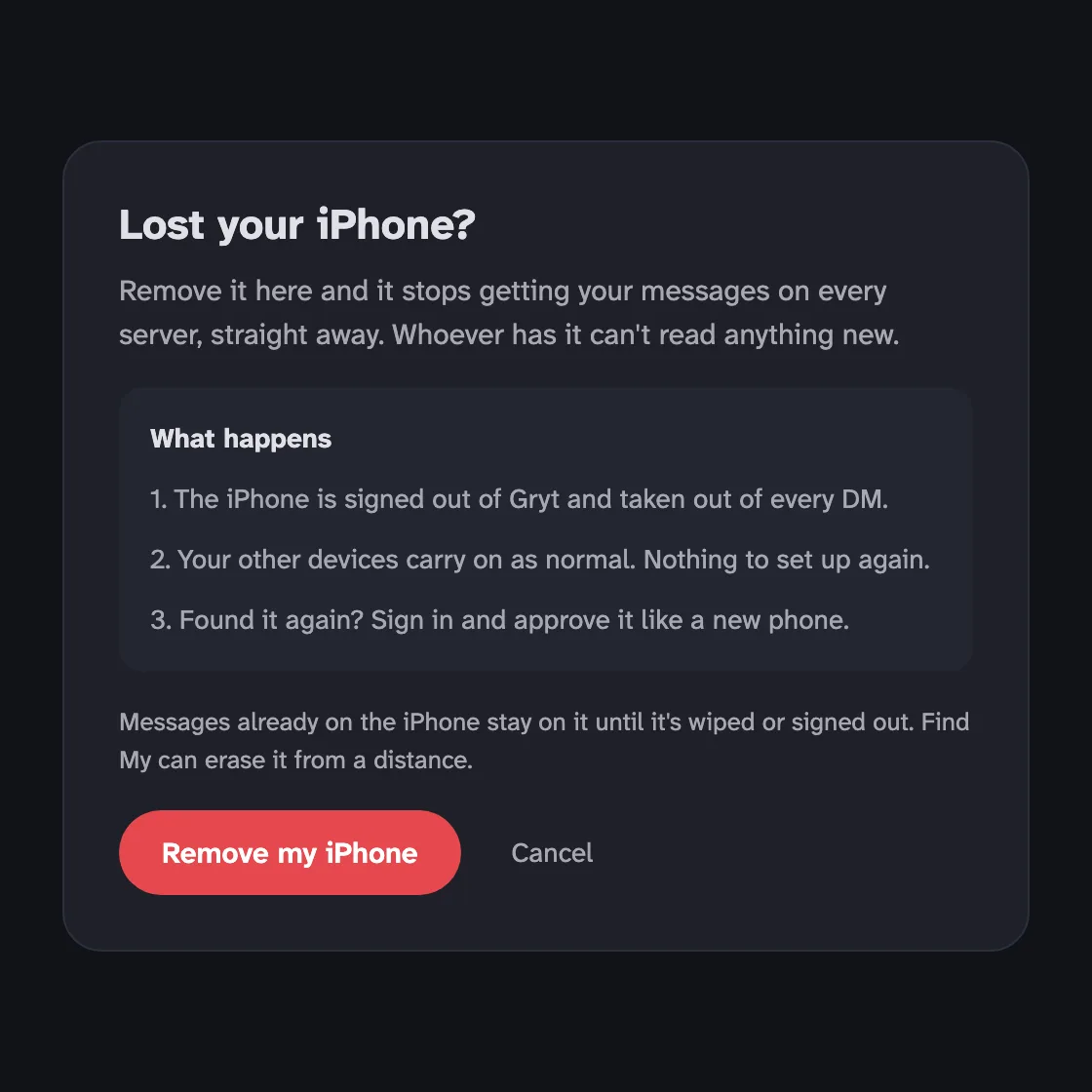 A sketch of the "Lost your iPhone?" window, explaining what removing it does: it's signed out and taken out of every DM, your other devices carry on, and if you find it again you approve it like a new phone
4.5 Messages that wait
One small thing that used to look broken: writing in a DM before your new device has been added to it. It used to fail with "try again in a bit". Now the message waits, says so, and sends itself once the device is in.
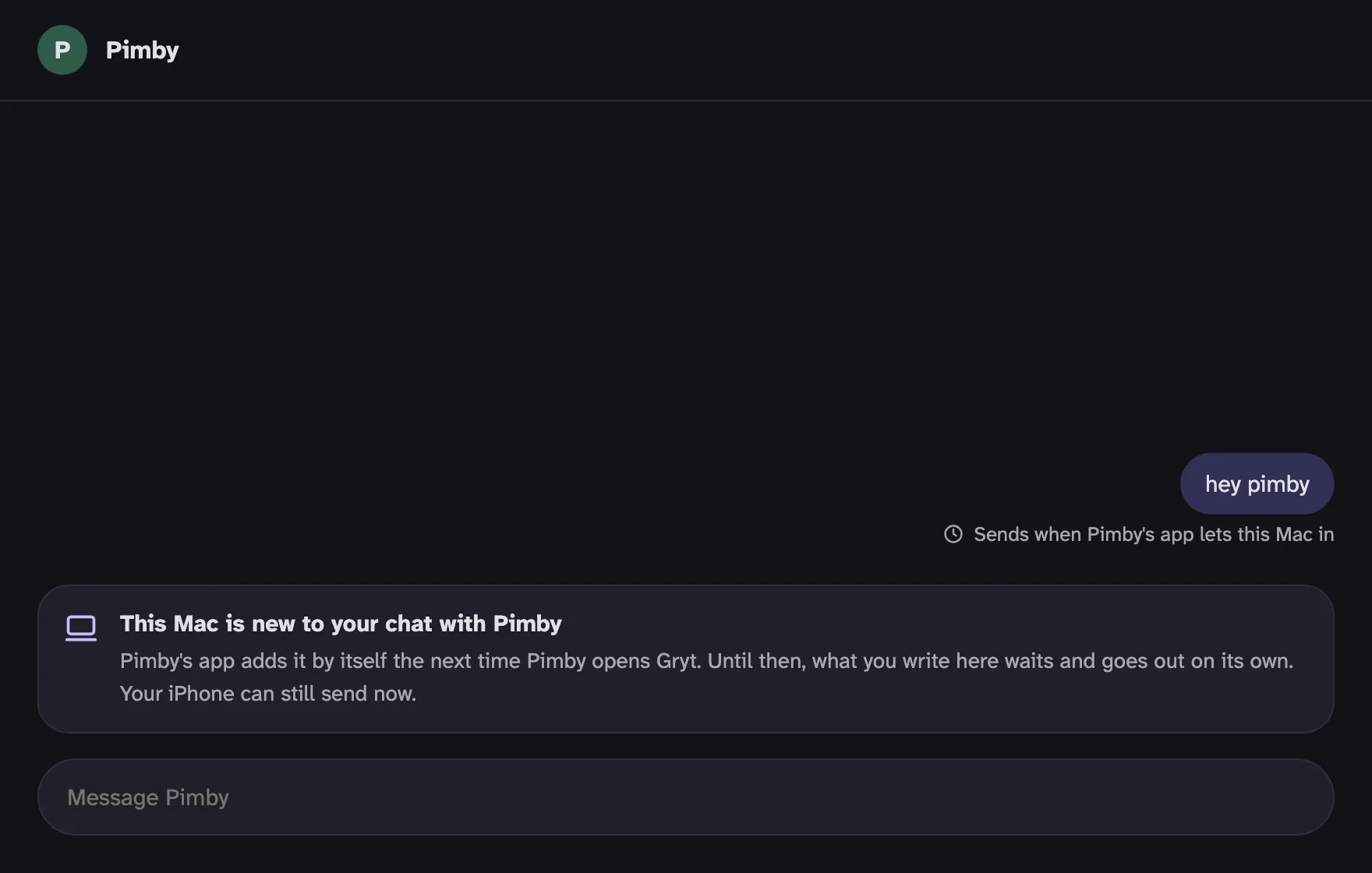 A sketch of a DM with Pimby on a new Mac. The message "hey pimby" says "Sends when Pimby's app lets this Mac in", and a note explains the Mac is new to the chat and gets added by itself
4.6 Your devices watch the key book
Each of your devices checks the key book when it starts. If your account has a key that none of your devices made, they tell you once, with a button to change your password. That catches a reset you didn't ask for, or a key added by someone who shouldn't have been able to.
5 The sketches
The pictures in this post are sketches I drew with Claude on a canvas, before building anything, because the screens kept turning out to be where the design was wrong. Writing "a device asks to be approved" is easy. Drawing the window someone sees on a new computer at eleven at night makes you notice it says "another device" when it should say "your iPhone", or that it asks a question nobody can answer.
That's how Gryt uses AI in general [3]. Claude helped draft these screens and much of the code behind them. Anything that touches your keys only merges after I've read the whole diff myself.
6 What this doesn't protect against
- Your Apple ID or Google account. If someone has your Gryt password and your Apple ID, they get your key from iCloud Keychain. That's the same trade-off as Apple's own Messages, and your Apple ID is the lock there.
- An unlocked phone in someone else's hand. Approving asks for Face ID or your passcode, which helps, but it can't help if they have both.
- Whoever runs the server. They can change rows in their own database. Your contacts' apps remember your key and warn when it changes, but they only warn, because a server doesn't tell them which account you are. Letting contacts check the key book would mean linking you across servers, and I'd rather not.
- The account service. It holds your public key, never the private one. If someone tampered with it, your own devices would see a key none of them made.
- A server you've never joined. Someone with your password can still join a server you're not on, as you. None of your contacts are there.
7 What's next
All of this is out in app 1.15.21 and server 1.12.18, and the old per-server handover is gone for good. Next is a way to keep your history in a locked box on a server you choose, so a new device can have everything even when your phone is off.
References
- Sivert Gullberg Hansen. The server can't read your direct messages. 9 September 2026.
- Barnes, R. et al. The Messaging Layer Security (MLS) Protocol. RFC 9420. https://www.rfc-editor.org/rfc/rfc9420
- Gryt docs. How Gryt uses AI.