Your Guest Identity Now Fits in a Password Manager
Using Gryt without an account meant living in one browser on one machine. Now it's 24 words you can paste onto your phone.
Title: Your guest identity now fits in a password manager
Date: 14 August 2026
Author: Sivert Gullberg Hansen
Keywords: identity, key derivation, recovery phrase, BIP 39, multi-device, privacy
Abstract
Since 1.5.0 you haven't needed an account to use Gryt: your client makes a key, and the key is who you are. But the key lived in one browser on one machine, and each server got its own, so there was nothing single you could back up or carry to your phone. Per-server keys are now derived from one 32-byte seed and the server's identity. Any device with the seed arrives at the same key for any server, including ones you join later, so there's nothing left to sync. Two servers still can't tell they're talking to the same person. The seed is shown as 24 words with a built-in checksum, made for pasting into a password manager. The same work fixed a bug where a server that changed address handed you a different identity. Bans on servers that accept guests are still easy to dodge, and this isn't federation.
1 Introduction
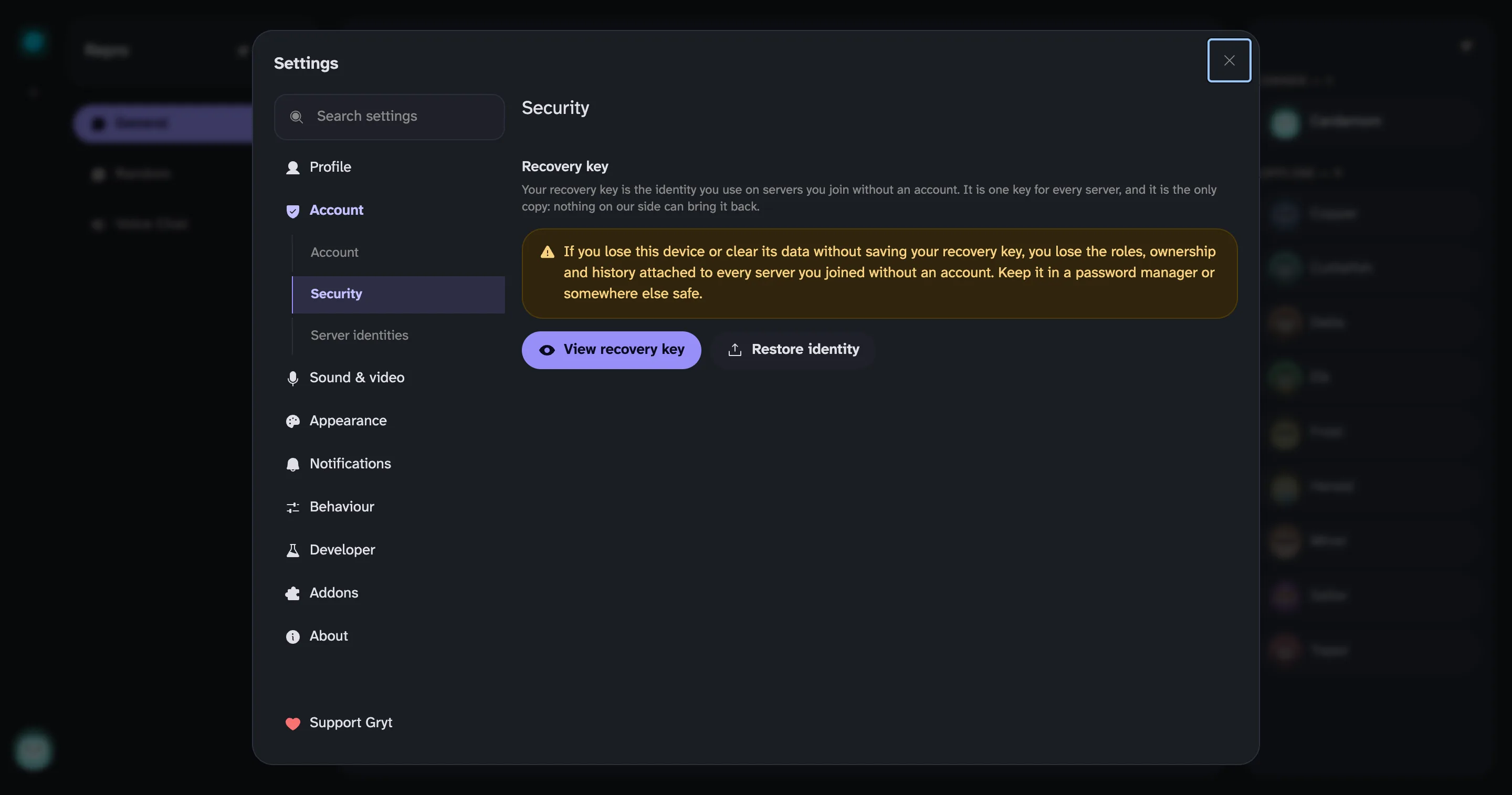 Gryt's Security settings, with a warning that losing this device without saving your recovery key loses the roles, ownership and history on every server you joined without an account, above View recovery key and Restore identity buttons
Figure 1: The Security settings, with the warning about what losing this device costs.
In 1.5.0 [1] you stopped needing an account to use Gryt. No email, no sign-up, no round trip to anything I run. Your client makes a keypair, the key is who you are, and that's enough. Joining a server only ever needed proof that the same person came back, and signing a challenge proves that on its own.
I still think that was the right call. But it had a bad day built into it, and the bad day looked like this: the key lived in one browser on one machine. Clear your site data and it was gone. With it went every server that identity was known on: your roles, your history, and any server you owned (Figure 1). Nobody could give it back, including me, because there was nothing to give back. The key was the account.
There was an escape hatch. You could save your identity to a file and restore it somewhere else. It worked, and almost nobody used it, and honestly I understand why: it went out of date every time you joined a new server. Each server got its own key, so the file you exported last week didn't know about the server you joined yesterday.
Carlo had been asking about federation, whether his users could join servers he didn't run. That's a much bigger question and I'll come back to it another time. Somewhere in the middle of it he asked something smaller:
But if you allow multiple servers for one key for gryt one could store the key in a password manager for cross device sign in
Not "can I federate", just "can I be me on my phone". The answer was no because there was no single thing to store. There were N things, one per server, and N kept going up. So this post asks:
- How can one secret stand for every server without making you trackable between them?
- What form should that secret take so people actually keep it?
2 Design
2.1 One seed, a key per server
The keys aren't generated any more. They're calculated.
There's one seed on your device, 32 random bytes, and every server's key is worked out from it, using the seed and that server's identity as the inputs. Same seed and same server always produce the same key, on any device, whether or not that device has ever spoken to that server before.
Your laptop and your phone don't have to exchange anything. Give them both the seed and they independently arrive at the same key for any server, including one you join next month. There's nothing left to sync, which means there's nothing left to go stale.
The property I was most worried about losing survived intact. Two servers still can't tell they're talking to the same person. The derived keys look unrelated to anyone who doesn't hold the seed, so the per-server separation that guest mode was built around is exactly as strong as it was.
2.2 Why the backup is words
The seed is shown as 24 words, taken directly from how Bitcoin wallets do recovery phrases [2]. It's a good format and there was no reason to invent another. The checksum is inside the words rather than sitting beside them. Table 1 shows how the bits add up.
Table 1: How 24 words hold a 256-bit seed and its checksum.
| Value | |
|---|---|
| Words in the standard list | 2048 |
| Bits per word | 11 |
| Bits in 24 words | 264 |
| Bits of seed | 256 |
| Bits of checksum, a hash of the seed | 8 |
So a mistyped or swapped word gets rejected instead of quietly making you somebody else. That's the failure I actually cared about, because being silently wrong is much worse than being told no. No two words in the list share their first four letters either, so a misread word usually isn't a word at all and fails before the checksum is even reached.
You're not meant to memorise them. Copy them into your password manager and move on with your day. The field you paste them back into is a real password field, so your manager will offer to save them the first time and fill them in after that. I use Bitwarden, self-hosted via Vaultwarden [3], and this was very much designed around that being the normal thing to do.
2.3 Using it
Don't have an account and want to be signed in on your phone?
- On your computer: Settings → You → Security → Show my identity backup
- Copy the 24 words
- On your phone: Settings → You → Security → I already have one, and paste
Same person, same servers, same roles.
It's deliberately out of the way. A first-time user shouldn't have to think about seeds, and nothing in the join flow mentions any of this. It's in settings under Security, next to the identity tools that were already there, for people who go looking.
3 Results: identities were filed under an address
While I was in here I found something I hadn't noticed. Your identity was filed under the address a server answered on. Servers move. Gryt picks a different port on its own if the one it wants is taken, and a self-hosted server on a home network gets a new address whenever the router feels like it.
When that happened, the client recognised the server correctly, and then handed it a completely different identity. You showed up as a stranger with no roles and no history, and nothing on screen said why. It looked like the server had forgotten you. That's also what broke direct messages on a second device.
Identities now belong to the server itself rather than to where it happens to be reachable. So it can move, and it can rotate its own identity key, and you're still you. A server you can reach both on your LAN and through a tunnel is now one identity on both, where it used to be two.
4 Discussion: limitations
- Bans on guests are easy to dodge. Making a new identity is still free, and it always will be. If you host a server that accepts people without accounts, a ban holds only until somebody decides to come back as somebody else. That comes with not requiring an account. The answer is still invites, the lobby, or requiring accounts if it matters to you.
- This isn't federation. It makes you portable across your own devices. It doesn't make you portable across identity providers, and Carlo still can't bring his own users to a server I run. There's groundwork in this release that makes that safe to build later, but it's groundwork and nothing more.
- The seed is everything. Anyone with the 24 words is you, on every server.
5 Conclusion
How can one secret stand for every server? Derive each server's key from one seed and that server's identity. Every device with the seed gets the same keys, and the keys still look unrelated to the servers.
What form should it take? 24 words with a checksum built in, pasted into a password manager rather than memorised.
Thanks to Carlo for the question. It was a better one than the one we had been arguing about.
References
- Gryt changelog. 1.5.0.
- Palatinus, M. et al. BIP 39: Mnemonic code for generating deterministic keys. https://github.com/bitcoin/bips/blob/master/bip-0039.mediawiki
- Vaultwarden. https://github.com/dani-garcia/vaultwarden