Gryt 1.7.0
BetaYou can message one person instead of a channel now, and call them from that conversation. Everyone without a picture is drawn as an owl.
Gryt has only ever had channels. Everything happened in a room somebody made, in front of whoever was in it. This release adds the other half: a conversation with one person, or with a handful, that isn't a channel and isn't listed for anyone else. You can ring somebody from inside it, and they get a call rather than a message they might read tomorrow.
They're encrypted, too. That came later in the 1.7 line than the rest of this, so an earlier version of this note said it hadn't happened yet. It has: a direct message is sealed on your machine before it goes anywhere, and the server stores something it can't read.
Messages that aren't in a channel
Start one from a member's card or the member list. It appears under the channels, in its own part of the sidebar, and only the people in it can see it.
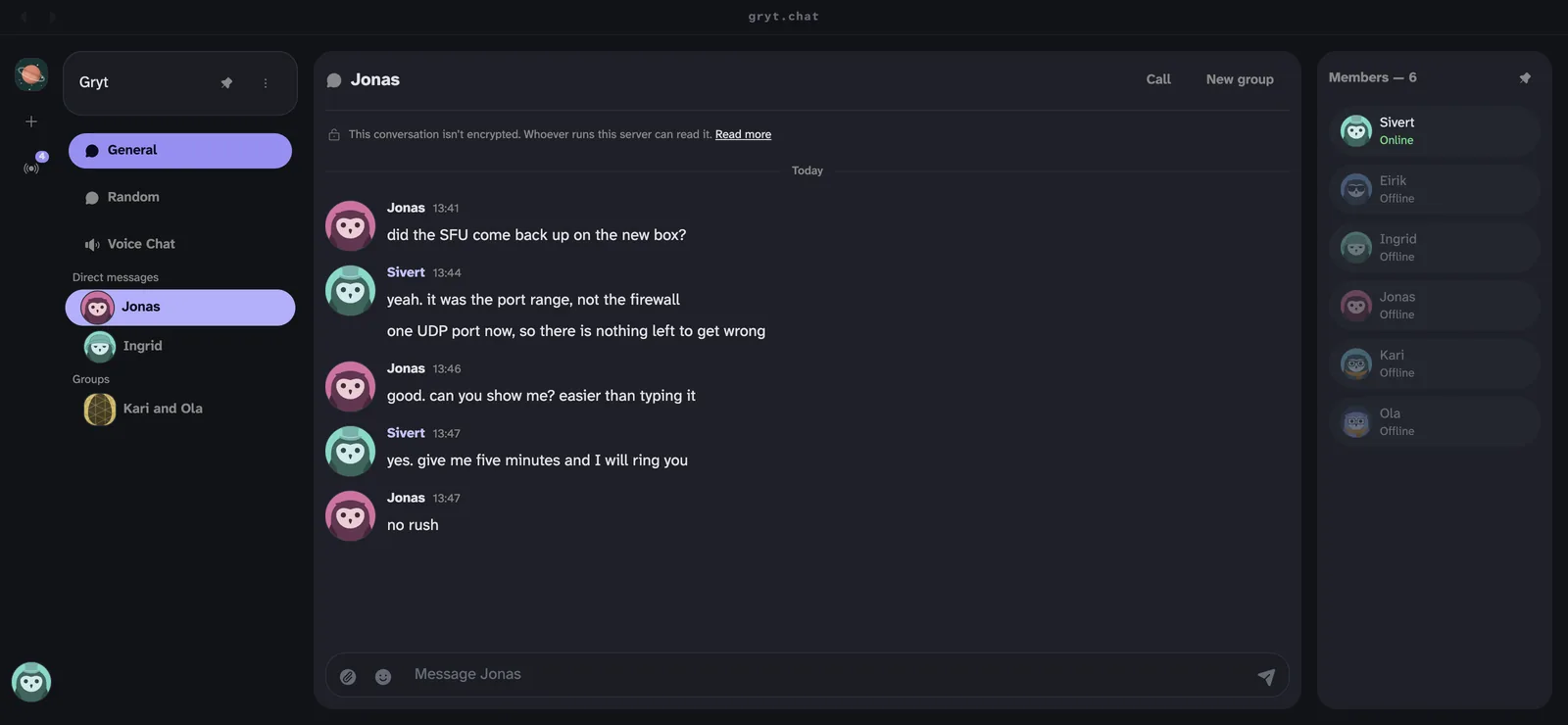
Groups get a section of their own under that one, and work the same way. Add a few people instead of one, and the conversation gets its own picture drawn from everyone in it. You can hide a conversation you don't want in the list without leaving it or deleting anything; it comes back when somebody writes in it.
Two things about messages changed while this was being built. There's a length cap now, so one person can't paste a novel into a channel and push everything off the screen. And a very long message folds down to a readable height with a control to open it, instead of taking over the view on arrival.
The server can't read them
A direct message is sealed before it leaves your machine, with a key wrapped once for each person in the conversation. You don't switch it on and you can't forget to.
It seals only when everybody in the conversation has a key it's willing to use. Sealing for most of a group would leave one person looking at a conversation they can't read while everyone else sees it working, which is worse than not sealing at all. When it can't seal, the line above the messages says so and links to the explanation — that's the line in the picture above.
Attachments go the same way. They used to go up as themselves, get thumbnailed, and be served to anybody holding the link, so a private conversation could have public photographs in it. They're encrypted before upload now, with the key inside the sealed message.
Your key is pinned the first time Gryt sees it. If it changes, it says so instead of carrying on, because a changed key is what a server inserting itself into a conversation looks like. That warning used to fire on a race every single time you joined a server, and then stay on screen for the rest of the session, which turned the one warning that means something into noise. It waits five seconds before speaking now, and you can dismiss it.
Pinning catches a key that changed. It can't tell you the first one was ever right, because the server is what introduced the two of you and no check made through the server gets past that. So there's a short code you and the other person can read to each other over anything else — a phone call, or standing in the same room. It's built from everything each side has pinned about the other, so substituting any part of it makes the two codes differ, and the server can't do anything about that because it never sees the comparison.
Ringing somebody from the conversation
Inside a direct message there's a call button. Pressing it rings the other person rather than putting you in a room and hoping they notice — their client rings, and the conversation row says a call is happening so somebody arriving late can join the one that's already running.
Three things around calls that were wrong before:
- The call says it is ending before it ends, rather than vanishing.
- If you're the only one left, the call closes itself instead of leaving you sitting in an empty room. You get a button to say you're still there if you meant to be.
- Your camera and screen share survive a reconnect. Before, a dropped connection left the room seeing your camera as off while it was still sending.
Everyone has an owl
If you haven't uploaded a picture, Gryt draws you one. It's an owl, generated from your identity, so it's yours and it's stable.
You can also design it. There's an editor with a wardrobe of hats, glasses and other pieces, a grid to browse what you've got, and a pinned preview that follows what you pick.
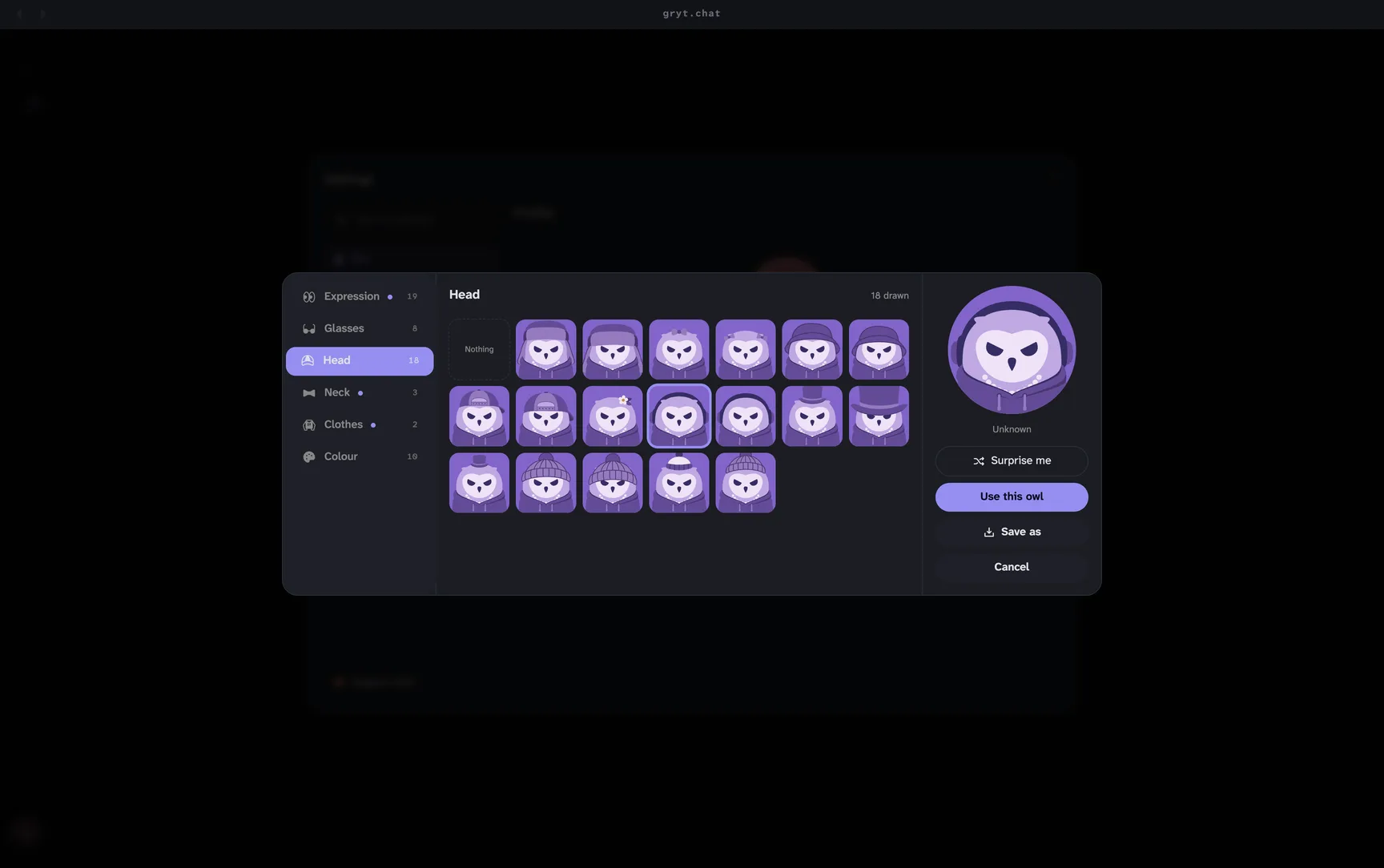
You can save the result to a file. Group conversations draw their picture from the owls of the people in them.
The voice tiles pick up the colour of the owl on them, so a call looks like the people in it rather than a grid of identical rectangles.
Changing how Gryt looks, without leaving Gryt
The theme editor is a panel inside the app that you can move around and keep open while you use it, so you can see a change land on a real conversation instead of a swatch. A theme is a couple of dozen hex values, which means a link is the whole theme. You can paste one somebody sent you, or send yours.
The panel floats over the app and follows every change as you make it, so a colour lands on a real conversation rather than a swatch. Drag it aside to see what it did to the part underneath.
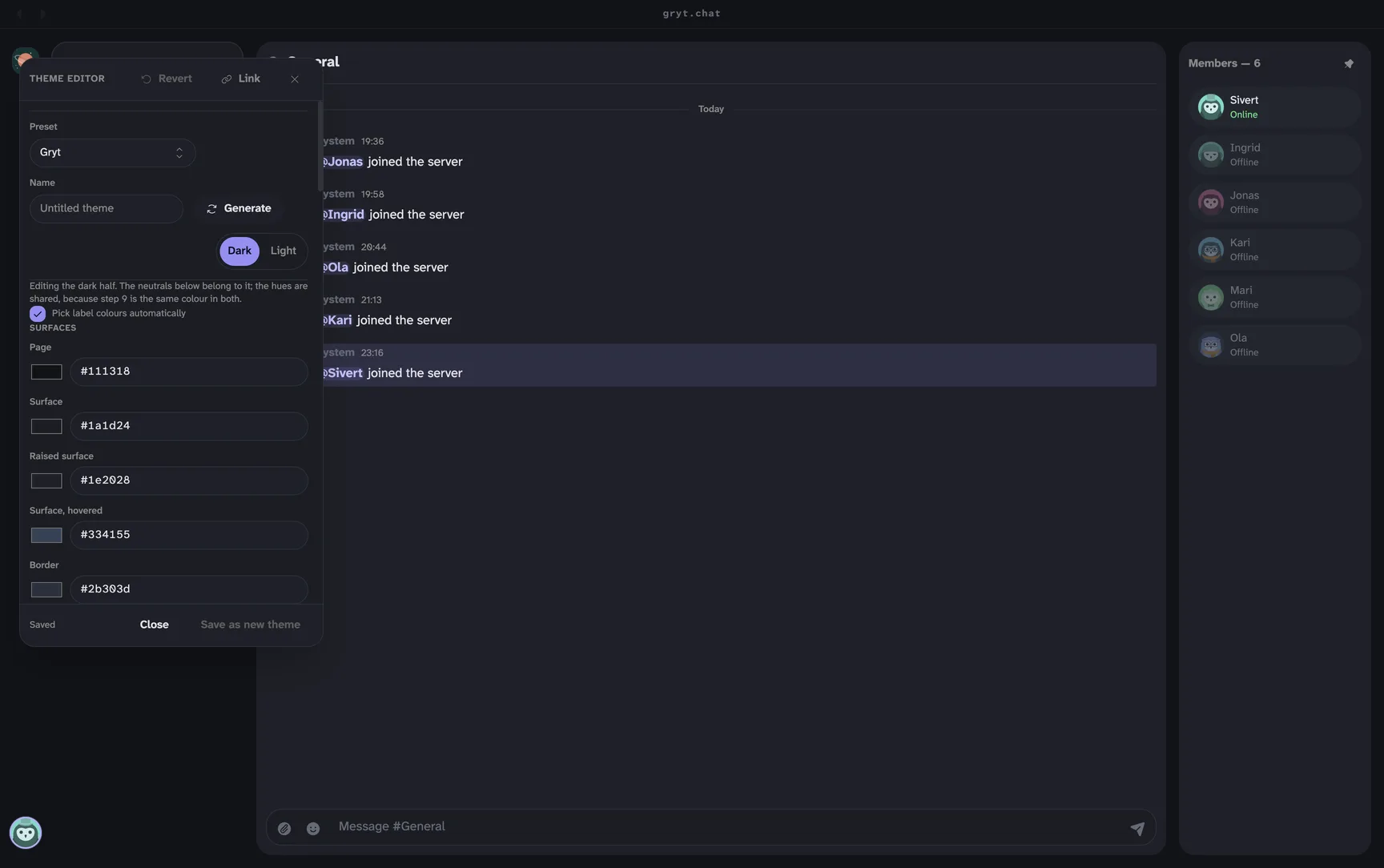
Whether Gryt fetches fonts from Google is a switch you control. Off means nothing is fetched.
A window you can shrink into a corner
Drag the window narrow and Gryt now drops what it cannot hold instead of pushing it off the edge. Here the member list has gone while the call, the channels and the conversation all stay. Before, the member list went over the right edge rather than getting out of the way.
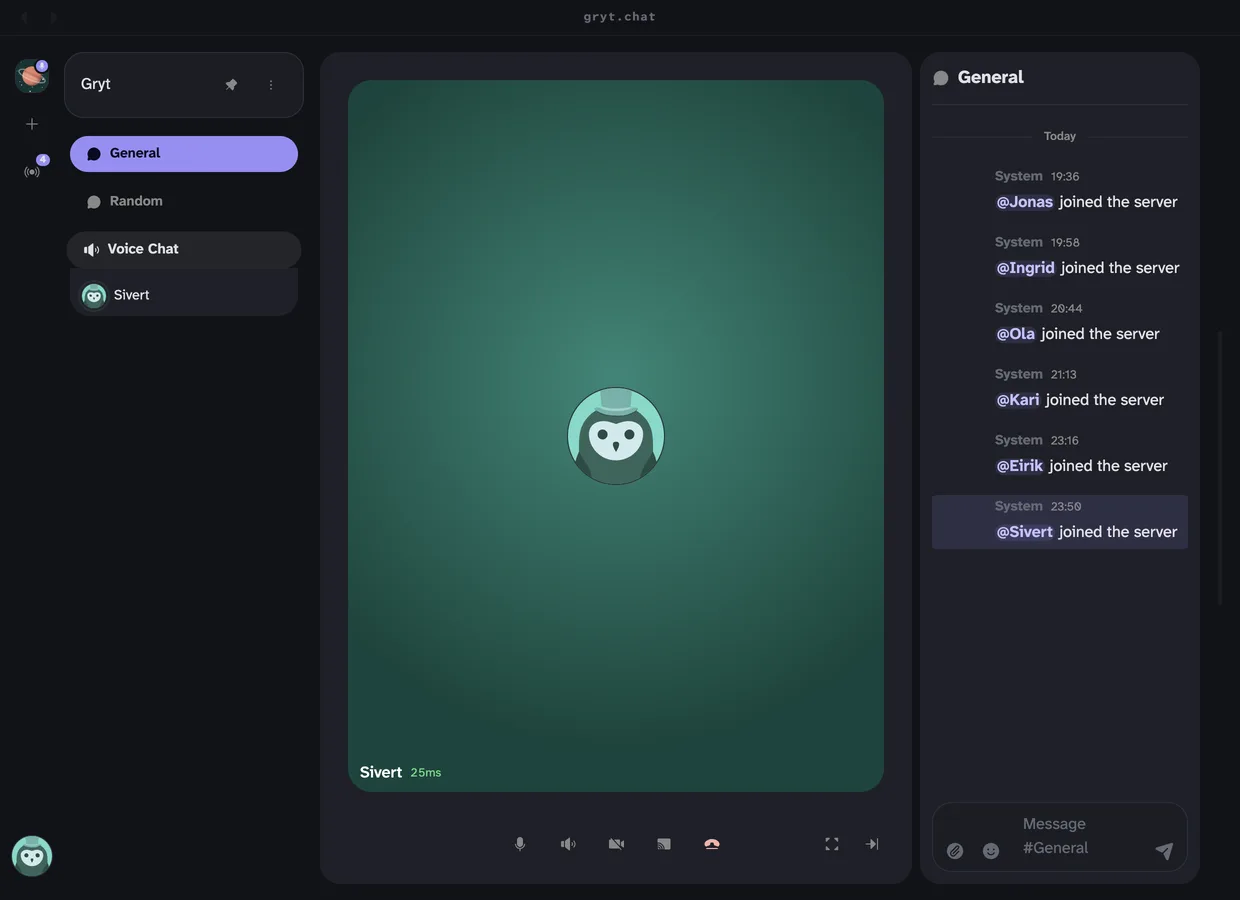
Below a certain width it becomes one channel, drawn flush to the window, with no rail and no lists. It's the shape you'd want for a conversation parked beside something else you're doing, and the way back is to make the window bigger.
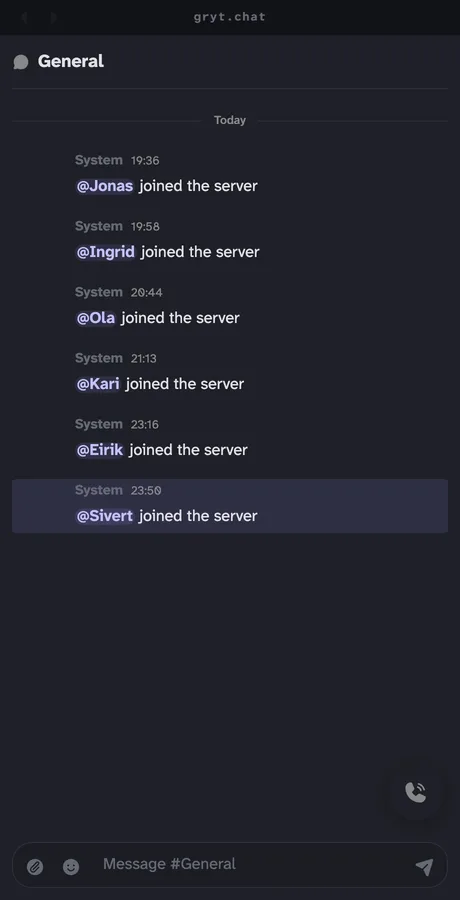
That floating button is the call. The controls stay reachable at every width, because a window with no mute button isn't one you want to be in a call from.
Updates that get out of the way
The updater works the way Bitwarden's does now: it checks while the app is running, downloads in the background, and installs when you let it. It tells you it is installing rather than going quiet. The splash screen is gone.
On Windows, the handoff that left some people stuck on an old version and unable to update is fixed. Anyone still stranded is sent to a download rather than to a folder of pending files.
For people running servers
Direct messages and calls are both permissions, so you decide who gets them. The role editor covers the fuller permission set, and the server publishes its own permission catalogue so the client stops offering actions the server will refuse.
Bots are their own tier. They knock before they're let in, they carry a tag that can't be faked, and there's a switch to turn knocking off entirely.
Other things you'll notice:
- The emoji upload limit is whatever you set. It used to be one number in two places that disagreed.
- Voice uses one UDP port for media instead of a range.
- The server says which addresses it actually answers on, which is most of the work when voice won't connect.
- A wrong clock on somebody's machine no longer makes your server unjoinable. It says which clock is wrong.
Security
- Every browser that joined a call was handed the secret the server registers with on the voice server. Anyone who had ever been in a call held it, and with it you could talk to the public voice server directly, claim any user id and enter any room, skipping every access check made here. The join payload carries a signed token for one user and one room now, and no password.
- The HTTP endpoints had one rate limit between them, on webhooks. Uploads, avatars, emoji and its importers, file serving and the rest were open. The worst was link previews, which fetches a URL the caller picks from inside the server's own network with no limit at all. All of them are limited now.
- SVG is refused for emoji uploads and skipped inside emoji ZIPs. An SVG can carry scripts, and Gryt was serving them from its own address. Anything already stored is served with headers that stop it running.
- Uploads carry a pixel ceiling on every path that decodes them, not just the first one.
- Animated server icons have a frame cap.
- Patched releases of pion, x/crypto, sharp and Next are in. Across the whole fleet that closed 254 dependency alerts.
- A replayed message gets its nonce back, so a replay is visible rather than silently accepted.
What this doesn't do
Encryption covers direct messages, not channels. A channel is stored as text on the server like it always was, and whoever runs it can read it. That's what a channel is for and it isn't changing.
A conversation is only sealed when everyone in it can be. Somebody on an old client, or one that hasn't published a key yet, means the whole conversation goes in the clear, and the line above the messages says so. It's the honest failure, but it does mean one person can hold a group open.
Comparing the code is on you. Nothing makes you do it, and until you have, you're trusting that the server introduced you to the person you think it did.
The short version
Direct messages
- Message one person, or a few, outside any channel
- Group conversations draw their own picture from the people in them
- Hide a conversation without leaving it. It returns when somebody writes
- Direct messages are their own permission
- Messages have a length cap, and a long one folds down until you open it
- They're encrypted end to end, with no setup, whenever everybody in the conversation has a key
- Attachments are encrypted too. They used to be served to anybody with the link
- A conversation that can't be sealed says so, in the conversation
- A key that changes is called out, and a short code you compare out loud catches one that was wrong from the start
Calls
- Ring somebody from a direct message instead of waiting for them to notice a room
- The conversation row says a call is happening, so you can join the one running
- A call you are alone in closes itself, with a button to say you are still there
- Calls say they are ending before they end
- Starting a call is a permission, separate from answering one
- Your camera and screen share survive a reconnect. They used to be seen as off while still sending
Avatars
- Everyone without a picture is drawn as an owl, generated from their identity
- An editor for designing one, with a wardrobe, a grid and a pinned preview
- Save an owl to a file
- Voice tiles take their colour from the owl on them
How Gryt looks
- A theme editor inside the app, in a panel you can move and keep open
- A theme is a link, so you can paste one somebody sent you
- Google Fonts is a switch. Off means nothing is fetched
- A narrow window drops what it cannot hold instead of running off the edge
- Very narrow, it becomes one channel drawn flush to the window
- Call controls stay reachable at every width
Updates
- Checks while running, downloads in the background, installs when you let it
- Says it is installing instead of going quiet
- The splash screen is gone
- Windows clients stuck on an old version can update again
Hosting
- The emoji upload limit is the one you set
- Bots are their own tier, knock before entry, and carry a tag that cannot be faked
- Bot knocking can be turned off
- Roles carry permissions, and the server publishes its permission catalogue
- One UDP port for media instead of a range
- The server names the addresses it answers on
- A wrong clock on a client no longer makes a server unjoinable
Security
- Every browser in a call held the server's shared voice secret, which let anyone enter any room as anyone. It's a signed per-user token now
- The HTTP surface had one rate limit. Link previews would fetch any URL a caller chose, from inside the server's network, unlimited
- SVG is refused for emoji, skipped in emoji ZIPs, and what is stored is sandboxed
- Every path that decodes an upload carries the pixel ceiling
- Animated server icons have a frame cap
- Patched pion, x/crypto, sharp and Next. 254 dependency alerts closed
- A replayed message returns its nonce, so replays are visible
Under the hood
- Voice lives in
@gryt/voice, shared by desktop and phone - The SFU pings connections and drops ones that stop answering
- The SFU says why before hanging up
- The SFU, not the server, decides who is in voice
- A socket reconnecting mid-restore is told to retry rather than refused
- The Doctor places a real call and names the broken hop
image-workerandvoicebuild on every pull request